Go to Site Settings → Embed to generate a ready-to-paste code snippet that embeds your Blackthorn Events page directly on any external website: no redirect, no separate tab, no custom development needed.
Choose which page to embed under Page Target:
- Event Overview: embeds your full event landing page (the one you designed in Page Designer)
- Event Group: embeds your group's public event listing using the
g/<groupKey>route - Cart (Dynamic): embeds the checkout experience directly, so visitors can register without ever leaving your site
Choose a Layout Preset to control how the embed fills space:
- Auto Height (recommended): the iframe grows with the content, no scrollbars
- Full Viewport (100vh): fills the entire browser height, best for standalone embed pages
- Fixed Size: set a specific pixel width and height; adds a scrollbar if content overflows
Once configured, a code snippet is generated at the bottom of the panel. Copy and paste it into any webpage: your website builder, a custom site, or anywhere that accepts HTML.
💡Use Cart (Dynamic) embed to drop a registration form directly into a marketing landing page: visitors complete the checkout without ever being redirected to a Blackthorn-hosted URL.
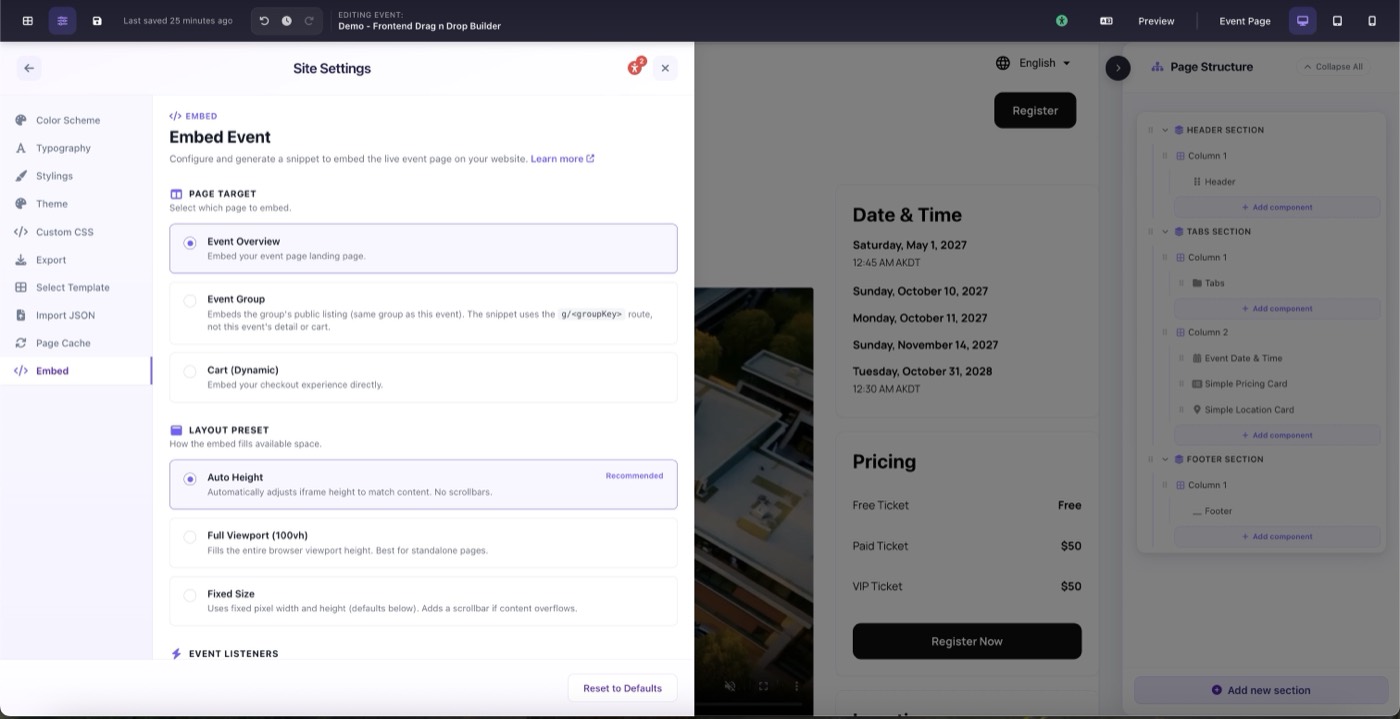
Site Settings → Embed: configure page target and layout preset, then copy the snippet