Your Branding Follows to Checkout

Prev Next

The checkout flow your attendees go through to register is powered by Dynamic UI, and it automatically inherits the branding you configured in Site Settings. Your colors, typography, and button styles carry through seamlessly into the registration experience without any extra setup.

The key Site Settings tokens that flow into the checkout:

Primary (--p)
Drives the Continue button, selected ticket highlight, active state indicators, and quantity controls (+/− buttons)
Base colors (--b1, --b2, --b3)
Sets the page background, card surfaces (ticket cards, order summary panel), and input field backgrounds
Font colors (--bc)
Controls all body text: ticket names, descriptions, prices, and form labels
Border radius
The button corner radius from Site Settings applies to the Continue button and ticket card borders for a consistent shape language
Typography
The UI font family set in Site Settings → Typography is used for all checkout text
⚠️ Granular control over individual checkout components or adding custom flows within the checkout is not supported. Branding is applied globally via Site Settings tokens: per-component overrides inside the checkout are not available.
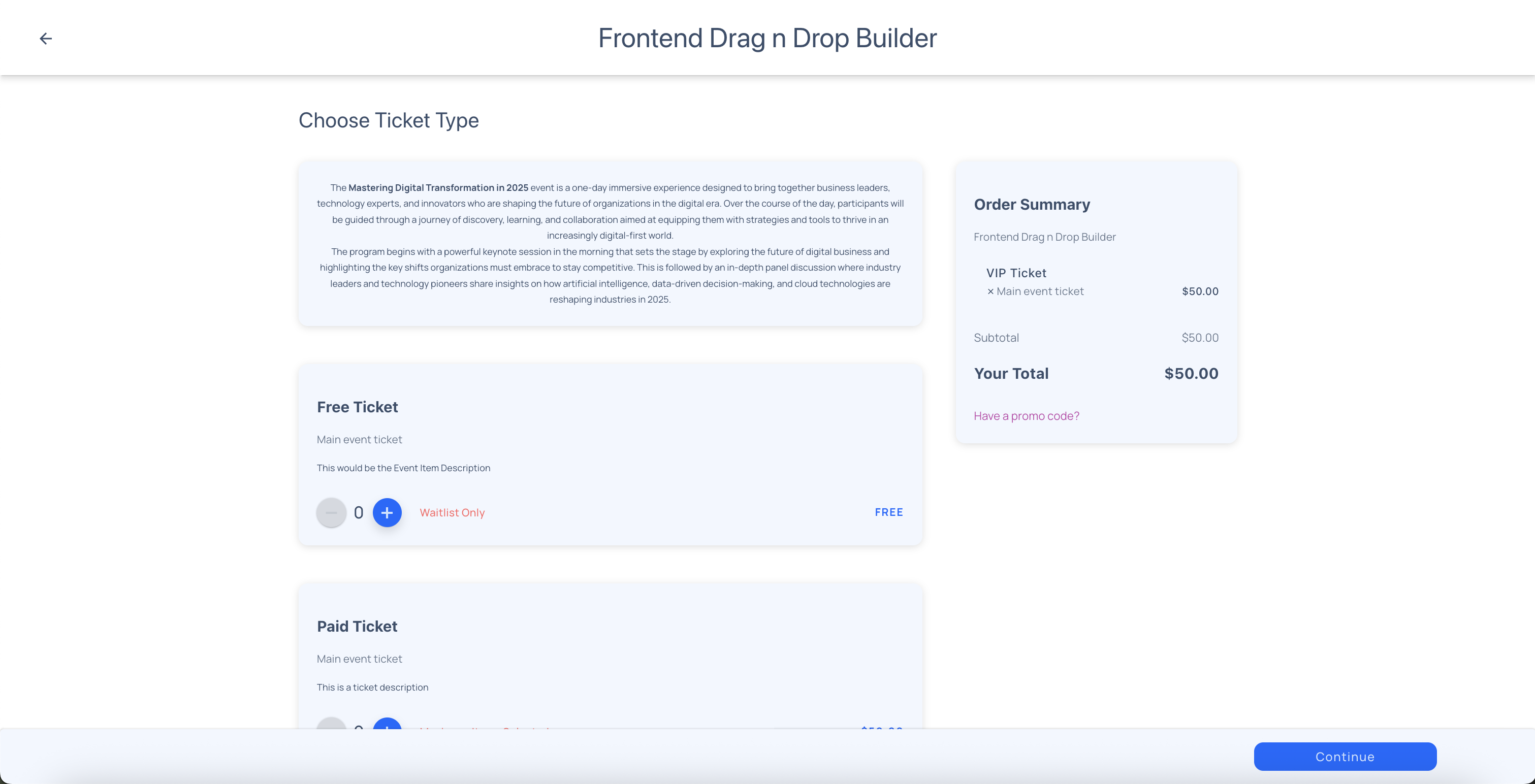
Dynamic UI checkout: ticket selection page inheriting brand colors, typography, and button styles from Site Settings