Use the new LWC Virtual Terminal on any Lightning Experience Cloud page, including those with Guest User (unauthenticated) access.
IMPORTANT TO KNOW
- The LWC Experience Cloud (Beta) does not enforce sharing rules.
- A guest must be assigned the site guest user permission set.
- Additional configuration for Account READ/WRITE and Contact READ/WRITE need to be assigned for relationship settings to work.
- The related to lookup field is not visible when enabled for a guest user.
- Enabling Allow Community Mode bypasses field-level security and sharing enforcement for authenticated community users, the same way guest mode does for unauthenticated users. Only enable it on Virtual Terminal instances you intend to expose in Experience Builder.
Experience Builder Component
The LWC Virtual Terminal is in the Visualforce component in the Experience Builder.
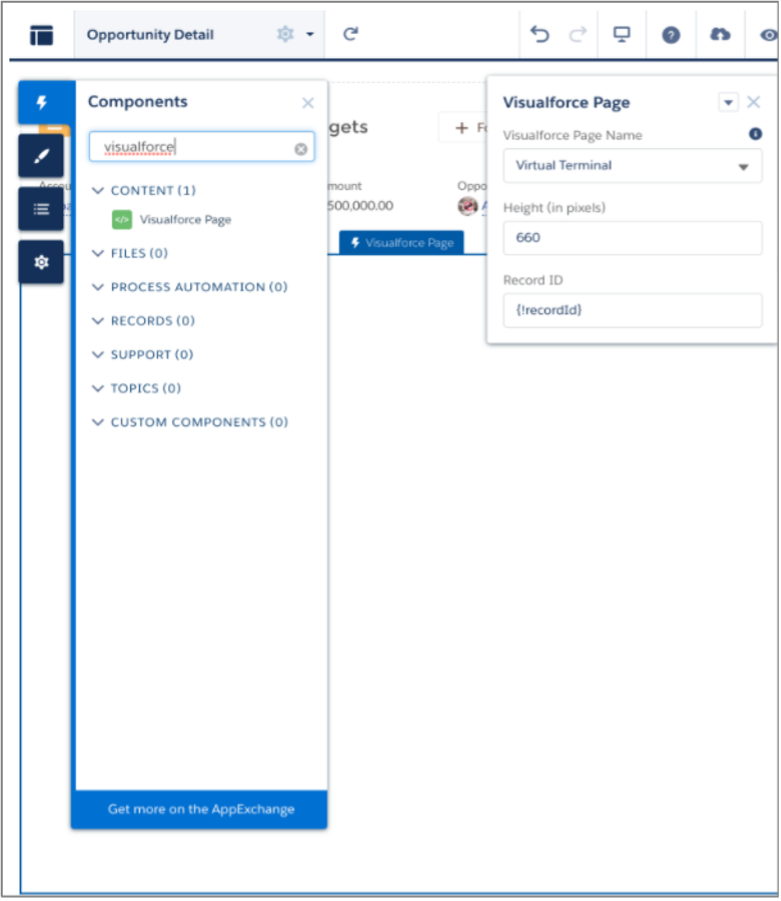
If the user cannot see the LWC Virtual Terminal in the Experience Cloud Builder or receives an error, please refer to our FAQ guide here.
Allow Community Mode (authenticated community users)
By default the LWC Virtual Terminal is available to guest (unauthenticated) users. To let authenticated Experience Cloud community users see, create, and pay with payment methods — matching the Aura Virtual Terminal — enable the Allow Community Mode property on the component:
- In Experience Builder, open the page that hosts the Virtual Terminal component.
- Select the Virtual Terminal component.
- In the component properties panel, check Allow Community Mode.
- Publish the Experience Builder site.
Allow Community Mode is a Boolean property, off by default. When enabled, the Virtual Terminal bypasses FLS and sharing enforcement for authenticated community users so that community users can work with their payment methods even when their related records are not shared to them. Leave it unchecked to keep the default behavior.