About
UTM Parameters are tags that you add to a URL. These tags remain consistent each time an Attendee moves between URLs, switches pages within an iframe, reloads a webpage, or moves through the Event registration process. Additionally, UTM parameters are available for all Events opened from an Event Group, regardless of whether the Event is embedded in an iframe.
The five standard UTM parameters are utm_source, utm_medium, utm_campaign, utm_term, and utm_content. Custom UTM parameters, such as utm_custom_param, can also be used.
When an Attendee clicks the URL, the tags are sent to Google Analytics/Google Tag Manager (or your preferred system) and tracked.
The tags are stored in the Attendees' local storage for 30 days after clicking the Event URL.
Click here for information about setting up UTM parameters with Google Analytics.
Setup
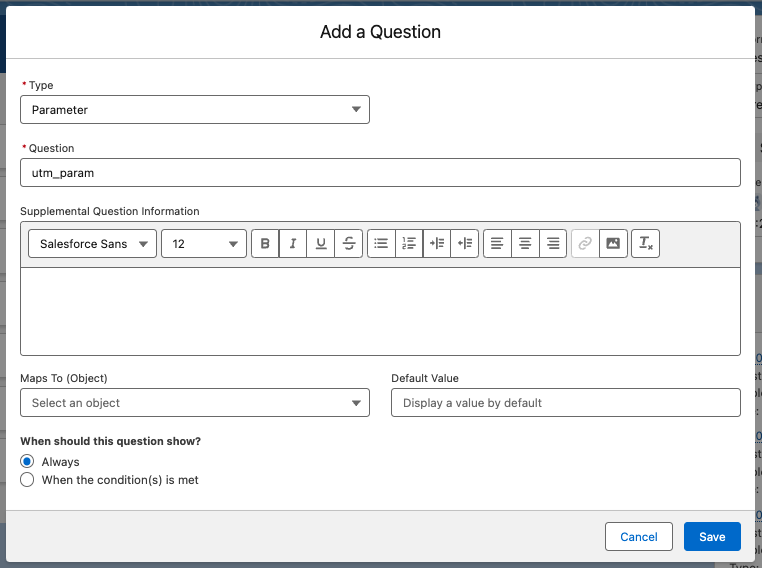
To define a UTM parameter on a form:
- Set the Form Element Type to “Parameter.”
- Let Attendees know if the question is Required.
- Enter the text in the Question field. The text entered here will be a part of the original URL.
- Complete the remaining fields as needed.
- Set When should this question show? to “Always.”
Example
Here is an illustration of an event registration URL with a UTM parameter appended (this is a sample, not a working link):
https://events.blackthorn.io/<your-event-registration-URL>?utm_param=utm_param_Value
Notice the ?utm_param=utm_param_Value at the end of the URL. Here, utm_param is the parameter you defined in the image above, and utm_param_Value is the value passed in.
After the attendee navigates anywhere in the URL, the ?utm_param=utm_param_Value disappears from the address bar. Even though it is no longer visible, all of the information is still tracked.