Do not delete Scheduler records.
Instead, update the Scheduler Status to “Unschedule” or “Archive” via the Smart Scheduler component.
The list of Email Scheduled Jobs is located under Schedule History on the Event Page. You can perform several actions for each job in the List view, depending on the Status of that job.
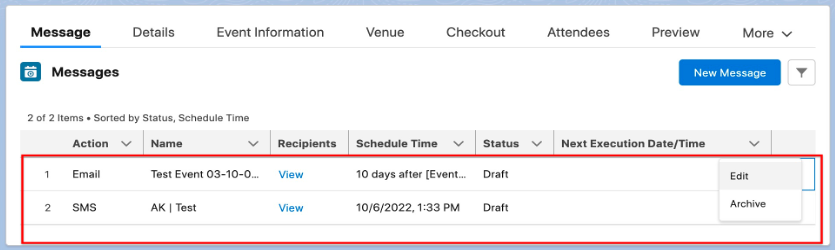
When the Scheduler Status = “Draft”, the options are to “Edit” and “Archive” the job.
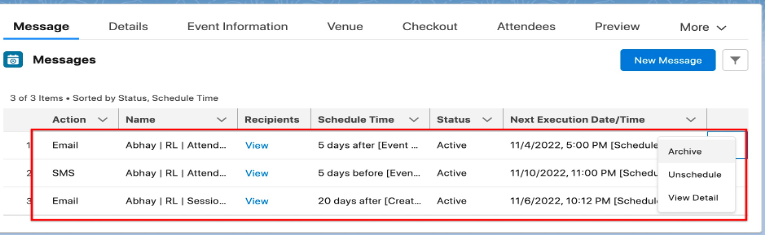
When the Scheduler Status = “Active”, the options are “Archive”, “Unschedule” and “View Detail”.
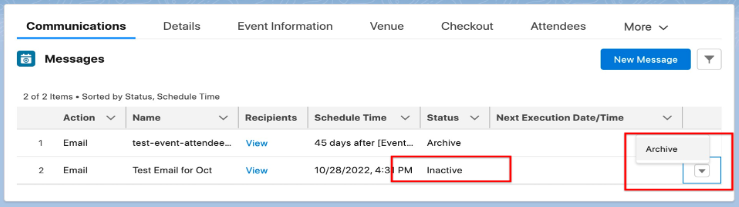
When the Scheduler Status = “Inactive”, the only option is to “Archive”.
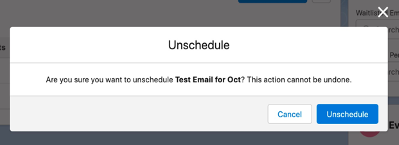
When the Scheduler Status = “Unschedule”, the job will be located on the History record. If you select “Unschedule”, you will receive the following message and the job will be removed from the list.
FAQ
Q: Can I migrate Schedule records from production to a sandbox?
A: No. When a Salesforce sandbox is refreshed from production, the sandbox will NOT contain the existing Schedule records that are in production. You will need to manually create the Schedule records in the sandbox.